
You need one thing to register on 6nnn Game. Your Pakistani mobile number. No ID documents. No lengthy forms. No waiting period. Your account activates the moment OTP verification is complete.
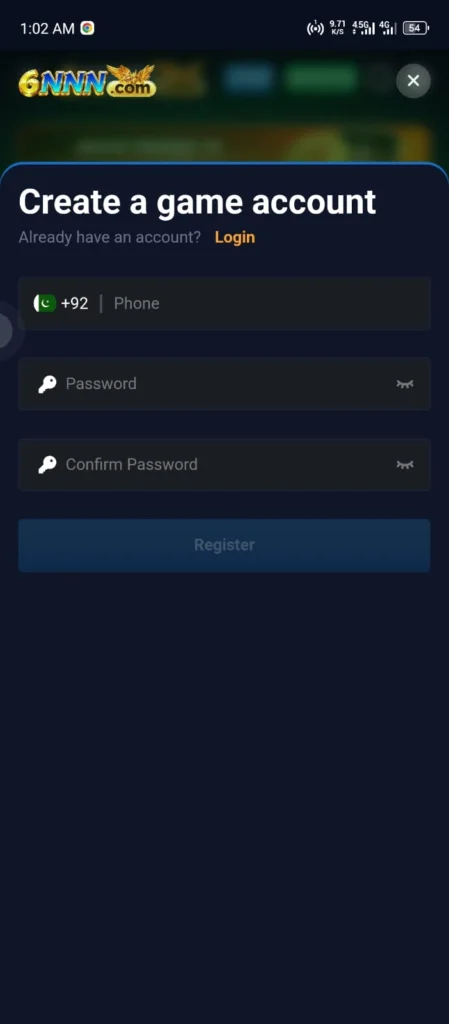
Registration: Every Step
Step 1. Open the 6nnn Game app on your Android phone or go to 6nnngameapp.pk in any browser.
Step 2. Tap Register or Sign Up on the main screen.
Step 3. Enter your active Pakistani mobile number. This number receives your OTP codes and is linked to your payment accounts, so use the number you check every day.
Step 4. Create a password. At least eight characters. Combine uppercase letters, lowercase letters, and numbers. Do not use your phone number, your date of birth, or any combination someone could guess with basic information about you.
Step 5. Referral code field. If someone shared a 6nnn Game referral code with you, enter it here. This is the only opportunity to add it. The field disappears permanently after your account is created. A referral code entered now earns you an additional entry bonus on top of the standard welcome package. If you have one, do not skip this step.
Step 6. Tap Submit.
Step 7. Enter the OTP code sent to your mobile number. Your account activates immediately after the correct code is accepted.
Step 8. Go to the Bonus or Promotions section and claim your welcome bonus. It does not add itself automatically. You tap Claim and it credits to your wallet.
Do These Four Things Right After Registration?
Players who do these immediately after creating their account set themselves up properly. Players who skip them often regret it later.
Claim your welcome bonus. Go to the Bonus section. Tap Claim. It is not in your wallet until you do this.
Link your payment account. Open the Wallet section and save your JazzCash or EasyPaisa number now. Doing it during setup means no interruption when you are ready to withdraw for the first time.
Switch to Urdu if you prefer it. Go to Settings or Profile. Find the language option. It is not on the home screen. Switch it now while you are setting things up rather than hunting for it mid-session later.
Check the missions board. Daily and new player missions are available from your first day. Knowing what they are before you start playing means you complete them naturally during your first session rather than missing them entirely.
Logging In
Open the app or go to 6nnngameapp.pk. Tap Login. Enter your registered mobile number and password. If you are on a new or unfamiliar device, complete OTP verification when prompted. Tap Login.
Your account dashboard opens immediately with your current balance, active bonuses, and VIP level all visible.
Logging In From Different Devices
| Device | Steps |
| Android phone | Open app, tap Login |
| iPhone | Open Safari, go to https://6nnngameapp.pk/, tap Login |
| Laptop or desktop | Open any browser, go to 6nnngameapp.pk, tap Login |
| New device | Login normally, verify identity with OTP |
Your balance, VIP progress, mission status, and complete game history are identical across every device. Nothing resets when you switch.
Resetting a Forgotten Password
Tap Forgot Password on the login screen. Enter your registered mobile number. Tap Send OTP. Enter the code that arrives on your number. Create a new password and confirm it. Tap Submit. Log in with your new password.
The entire process takes under two minutes. If the OTP does not arrive within two minutes, tap Resend and confirm you entered your number correctly.
Protecting Your Account
Unique password. If you use the same password across multiple platforms and one of those platforms experiences a data breach, your 6nnn Game account is immediately at risk. Keep your password unique to this platform.
Your OTP is for you only. Never read it aloud to anyone, share it in a message, or enter it on any screen other than the official verification step inside the platform.
Log out of shared devices. If you ever access your account from a friend’s phone or a shared computer, log out before you leave.
Change your password periodically. Every few months is a reasonable interval. Updated passwords reduce the window of exposure if your credentials are ever compromised.
Contact support immediately if you notice any account activity you did not initiate, any balance changes you cannot explain, or any login alerts from devices you do not recognize.
Registration and Login Problems
| Problem | Solution |
| OTP not arriving | Wait two minutes, tap Resend, confirm number is correct |
| Wrong password error | Check Caps Lock. Use Forgot Password if unsure of exact credentials. |
| Account locked after failed attempts | Wait five to ten minutes then use Forgot Password to reset properly |
| Forgot to enter referral code | Contact live chat support immediately after registration. Do not create a second account. |
| Registered with wrong number | Contact support. Provide your correct number. They will fix it. Do not make a new account. |
| Account showing suspended | Contact support through live chat for specific details and resolution |
FAQs
Can I have more than one account?
No. Multiple accounts are prohibited and result in permanent suspension of all associated accounts. Wallet balances in confirmed multiple-account cases are not refunded. Register once and use that account.
Do I need documents to register?
Registration requires only your mobile number and OTP verification. Identity documents may be requested later for larger withdrawal amounts as a standard anti-fraud step.
Can I register with a number that belongs to someone else?
No. Your registered number is tied to your payment accounts and identity verification. Always register with your own active number.
Register and Login on 6nnn Game

Create your 6nnn Game account in under 2 minutes at 6nnngameapp.pk. Step by step guide for new players plus forgot password reset. Full Pakistan 2026 guide.
Price: Free
Price Currency: PKR
Operating System: Android 5.0+
Application Category: Casino Game
4.9